- What Are DevSecOps Practices and Why Do They Matter?
- DevSecOps Best Practices Checklist for Secure CI/CD Pipelines
- Best DevSecOps Practices for Cloud Environments
- Advanced DevSecOps Best Practices Guide for Mature Teams
- Implementation Roadmap for DevSecOps Engineers
- Building a Security Culture in DevSecOps Teams
- Conclusion
Security was always supposed to be part of the plan. But in most teams, it gets pushed to the end. The code is written, the product is nearly ready, and then someone says, "Wait, we need a security review."
That last-minute approach is exactly why breaches happen. And it is exactly what DevSecOps Best Practices are designed to fix.
This guide covers everything from securing your CI/CD pipeline to cloud security controls, advanced strategies for mature teams, and how to build a security-first culture that actually sticks.
TL;DR — Quick Summary
| Topic | Key Point |
| What is DevSecOps | Security is integrated into every stage of development, not just the end |
| Shift-Left Approach | 70% of vulnerabilities caught before production with early security testing |
| CI/CD Security | Automate SAST, DAST, container scans, and IaC checks at every pipeline stage |
| Cloud Security | Use secrets management tools, minimal container images, and Zero Trust controls |
| Zero Trust Impact | Organizations using Zero Trust report 85% fewer breaches |
| Advanced Practices | Policy as Code, centralized logging, and dependency scanning for mature teams |
| Culture Matters | Consistent security training reduces security risks by up to 50% |
| Incident Response | Automation leads to 60% faster incident response times |
What Are DevSecOps Practices and Why Do They Matter?
Most development teams treat security as a separate step. DevSecOps changes that by making security everyone's responsibility from day one. DevSecOps Practices integrate security directly into the CI/CD pipeline. Instead of a security team reviewing code at the end, checks happen automatically at every stage of development. Vulnerabilities get caught early when they are cheaper and easier to fix.
This approach follows the "shift-left" philosophy. The earlier you test for security issues, the less damage they can do. A DevSecOps Engineer sits at the center of this. Their job is to automate security checks, monitor risks across the pipeline, and help development, operations, and security teams work together rather than in silos.
In our DevSecOps workshops, over 65% of teams initially rely on end-stage security reviews. Within 6–8 weeks of implementation, most shift to automated pipeline checks with measurable defect reduction.
DevSecOps Best Practices Checklist for Secure CI/CD Pipelines
A solid DevSecOps Best Practices Checklist covers every stage of the development lifecycle. Here is what that looks like in practice.
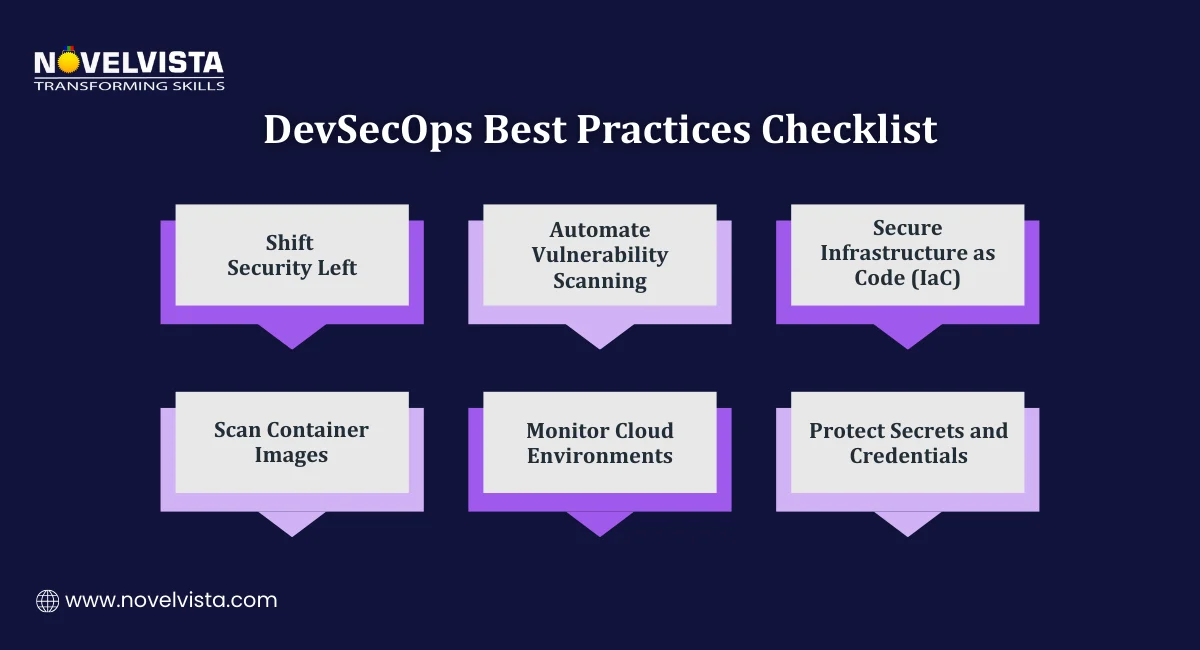
1. Shift Security Left
The core idea behind shifting left is simple. Test earlier. Fix faster. Instead of running security checks after the code is complete, integrate them during development. This means:
- Running SAST (Static Application Security Testing) on source code as developers write it
- Running DAST (Dynamic Application Security Testing) against running applications before they reach production
- Flagging vulnerabilities while the context is still fresh in the developer's mind
2. Automate Security Scanning
Manual security reviews do not scale. Automated scanning does. A good DevSecOps Best Practices Checklist includes automated scans across three key areas:
- Source code: Catch insecure coding patterns and known vulnerability signatures
- Container images: Scan base images and layers for outdated packages or misconfigurations
- Third-party dependencies: Identify vulnerable open-source libraries before they reach production
These scans should run at every stage of the CI/CD pipeline. Not just at the end. Every commit, every build, every deployment. In real project implementations, teams that enforce scan-on-commit policies see up to 30% fewer late-stage build failures compared to those scanning only at deployment stages.
3. Secure Infrastructure as Code (IaC)
Infrastructure as Code means your servers, networks, and cloud resources are defined in files like Terraform configurations and Kubernetes YAML files. That is powerful. It also means a misconfiguration in a file can expose an entire cloud environment.
Scanning IaC files before deployment catches these issues early. Tools like Checkov and Terrascan analyze your configurations and flag security risks before anything gets deployed.
This step is often missing from basic security setups but makes a significant difference in cloud environments.
Best DevSecOps Practices for Cloud Environments
Cloud platforms bring flexibility and scale. They also bring a new set of security challenges that traditional approaches were not built for. Applying the best DevSecOps practices for cloud environments means addressing these challenges head-on.
1. Secrets Management
Hardcoded credentials are one of the most common and avoidable security mistakes. API keys, database passwords, and access tokens should never sit in a code repository.
Instead, use dedicated secrets management tools:
- HashiCorp Vault: Stores, manages, and controls access to secrets across services
- AWS Secrets Manager: Integrates directly with AWS services to rotate and retrieve credentials securely
A DevSecOps Engineer sets these tools up as part of the pipeline so secrets are never exposed in plain text at any point in the development process. In hands-on labs, over 50% of participants initially store credentials in code repositories. After implementing vault-based access, secret exposure incidents typically drop to near zero.
2 Container Security
Containers are everywhere in modern development. They are also a common attack surface if not managed carefully. Two practices make a real difference here:
- Use minimal base images: Distroless images contain only what the application needs to run. Less code means fewer vulnerabilities.
- Implement Role-Based Access Control (RBAC): Enforce least-privilege policies so containers only have access to what they actually need. Nothing more.
These controls reduce the blast radius if a container is ever compromised.
3. Zero Trust and Principle of Least Privilege
Zero Trust is a security model built on one idea. Never assume any user, device, or service is trustworthy by default. Verify everything.
In practice, this means:
- Microsegmentation: Dividing your network into small zones so that access to one area does not automatically grant access to others
- Strict access controls: Every service and user gets the minimum permissions required to do their job
- Continuous verification: Access is not granted once and forgotten. It is checked repeatedly.
The results are significant. Organizations that adopt Zero Trust report 85% fewer breaches compared to those using traditional security models.
Applying best DevSecOps practices for cloud environments means Zero Trust is not an optional extra. It is a foundational control that every mature team should have in place.
Advanced DevSecOps Best Practices Guide for Mature Teams
Once the basics are in place, the next step is building a more sophisticated security setup. This DevSecOps Best Practices Guide covers the strategies that separate teams with a solid security foundation from those with a truly mature DevSecOps practice.
1. Policy as Code
Writing security policies in documents that nobody reads does not work. Policy as Code turns those policies into automated rules that run inside your pipeline.
Tools like Open Policy Agent (OPA) let you define security and compliance rules in code. These rules then act as automated gates in your CI/CD pipeline. If a build does not meet the policy requirements, it does not move forward. No manual review needed. No exceptions slipping through.
This approach works because it removes human error from policy enforcement. The rules are consistent, auditable, and always on.
2. Continuous Monitoring and Logging
Deploying secure code is important. Knowing what happens after deployment is equally important.
Continuous monitoring gives your team real-time visibility into what is happening across your cloud infrastructure. A DevSecOps Engineer sets this up using:
- ELK Stack (Elasticsearch, Logstash, Kibana): Collects, processes, and visualizes logs from across your systems in one place
- SIEM platforms (Security Information and Event Management): Aggregate security data and trigger alerts when suspicious activity is detected
The goal is to catch unusual behavior before it becomes a serious incident. A login attempt from an unexpected location, a service making unusual outbound connections, a sudden spike in failed requests, these are signals that something may be wrong.
In SOC-aligned environments, we train, centralized logging reduces mean time to detect (MTTD) by nearly 40%, especially when correlated alerts are configured across multiple services.
Without centralized logging, these signals get lost in the noise.
3. Dependency and Open-Source Security
Most modern applications use dozens of open-source libraries. Each one is a potential entry point if it contains a known vulnerability.
This part of the DevSecOps Best Practices Guide focuses on keeping your dependencies clean:
- Use tools like Snyk or Dependabot to automatically scan dependencies for known vulnerabilities
- Lock package versions in your dependency files so that updates only happen when reviewed and approved
- Set up alerts so your team knows immediately when a new vulnerability is discovered in a library you use
Supply chain attacks are on the rise. A vulnerability in a widely used open-source package can affect thousands of applications at once. Scanning dependencies regularly is one of the most important DevSecOps Best Practices any team can adopt.
Implementation Roadmap for DevSecOps Engineers
Knowing the practices is one thing. Putting them in place in a structured way is another. This roadmap gives DevSecOps Engineers a clear path from assessment to optimized implementation.
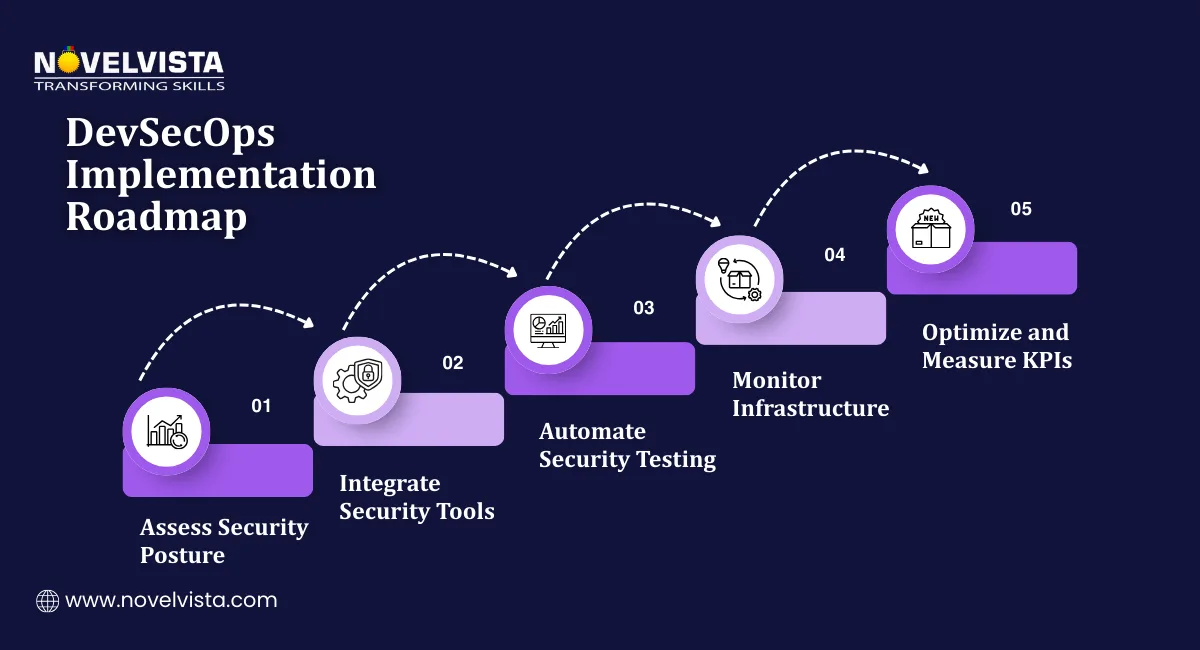
Step 1: Assess Your Current Security Posture
Before adding any new tools or processes, understand where you stand today. This means:
- Auditing your existing CI/CD pipelines to identify where security checks are missing
- Reviewing your development workflows to find gaps between how code is written and how security is applied
- Tagging assets with metadata, including owner, environment, and risk classification
This assessment gives you a baseline. Without it, you are making changes without knowing what problem you are actually solving.
Step 2: Integrate Security Tools Into Your Pipeline
Once you know the gaps, start filling them systematically. Key actions at this stage include:
- Adding automated SAST and DAST tools to your CI/CD pipeline at the right stages
- Setting up container image scanning as part of your build process
- Enabling intrusion detection systems such as Suricata or OSSEC to monitor for suspicious activity across your infrastructure
- Integrating secrets management tools so credentials are never stored in repositories
A DevSecOps Engineer leading this step should prioritize high-risk gaps first. Fix the biggest exposures before working down to lower-priority items.
Step 3: Optimize and Measure Results
Implementation is not the finish line. Once tools are in place, the focus shifts to measuring how well they are working and improving over time.
Track security KPIs such as:
- Number of vulnerabilities caught at each pipeline stage
- Time taken to remediate identified issues
- Frequency of security incidents post-deployment
- Percentage of builds blocked by automated security gates
Refine your processes based on what the data tells you. Organizations that automate security testing and monitoring consistently report 60% faster incident response times. That improvement does not come from the tools alone. It comes from continuously tuning how those tools are used.
We consistently advise tracking a limited set of KPIs initially, as teams monitoring more than five metrics often struggle with actionable insights during early DevSecOps adoption stages.
Building a Security Culture in DevSecOps Teams
Technology handles a lot. But it does not handle everything. A team that treats security as someone else's problem will find ways around even the best tools. Building a security-first mindset across your development team is just as important as any tool you put in your pipeline.
Here is what that looks like in practice.
1. Encourage a Security-First Mindset
Security should not feel like a blocker. It should feel like a normal part of how work gets done.
This means involving developers in security conversations early. When developers understand why a particular check exists, they are far more likely to write code that passes it. When they find out about a rule only when their build fails, they look for workarounds.
A DevSecOps Engineer plays a big role here. They act as a bridge between the security team and developers, translating requirements into practical guidance that developers can actually act on.
2. Treat Vulnerabilities as Learning Opportunities
When a vulnerability is found, the worst response is to assign blame. The best response is to ask why it happened and what can prevent it next time.
Teams that treat vulnerabilities as learning opportunities build better instincts over time. Post-incident reviews, shared lessons learned, and open conversations about what went wrong create a culture where people flag issues rather than hide them.
3. Provide Regular Security Training
DevSecOps Practices only work when the people involved understand the risks they are managing.
Regular training keeps that understanding current. A good starting point is the OWASP Top 10, a regularly updated list of the most common and serious web application security risks. Training developers on these risks helps them recognize and avoid them while writing code.
The impact is measurable. Organizations that provide consistent security training see up to 50% reduction in security risks. That is a significant return on a relatively low investment.
This is the final piece of a complete DevSecOps Best Practices Checklist. Tools secure the pipeline. Culture secures the people building it.
Conclusion
DevSecOps Best Practices work because they treat security as a continuous process rather than a final checkpoint.
When security is shifted left, automated across the pipeline, applied properly in cloud environments, and supported by a team that genuinely understands the risks, the results are clear. Fewer vulnerabilities reach production. Incidents are caught faster. Recovery is quicker.
This DevSecOps Best Practices Guide has covered the full picture, from the foundational checklist every team needs, to advanced strategies for mature practices, to the cultural shift that makes all of it stick.
The organizations getting this right are not necessarily the ones with the biggest security budgets. They are the ones that follow a structured approach, measure what matters, and keep improving.

Next Step
If you want to build real expertise in DevSecOps and take your security skills to the next level, NovelVista's DevSecOps certification training gives you hands-on knowledge across the full development security lifecycle. From pipeline automation to cloud security controls, the course is built for professionals who want to do this properly.
Explore NovelVista's DevSecOps Certification Training and take the next step in your security career.
Frequently Asked Questions
Author Details

Course Related To This blog
DevSecOps Engineering
Confused About Certification?
Get Free Consultation Call